
Monitor Light Bar Compatibility: Check Screen Fit and USB Power
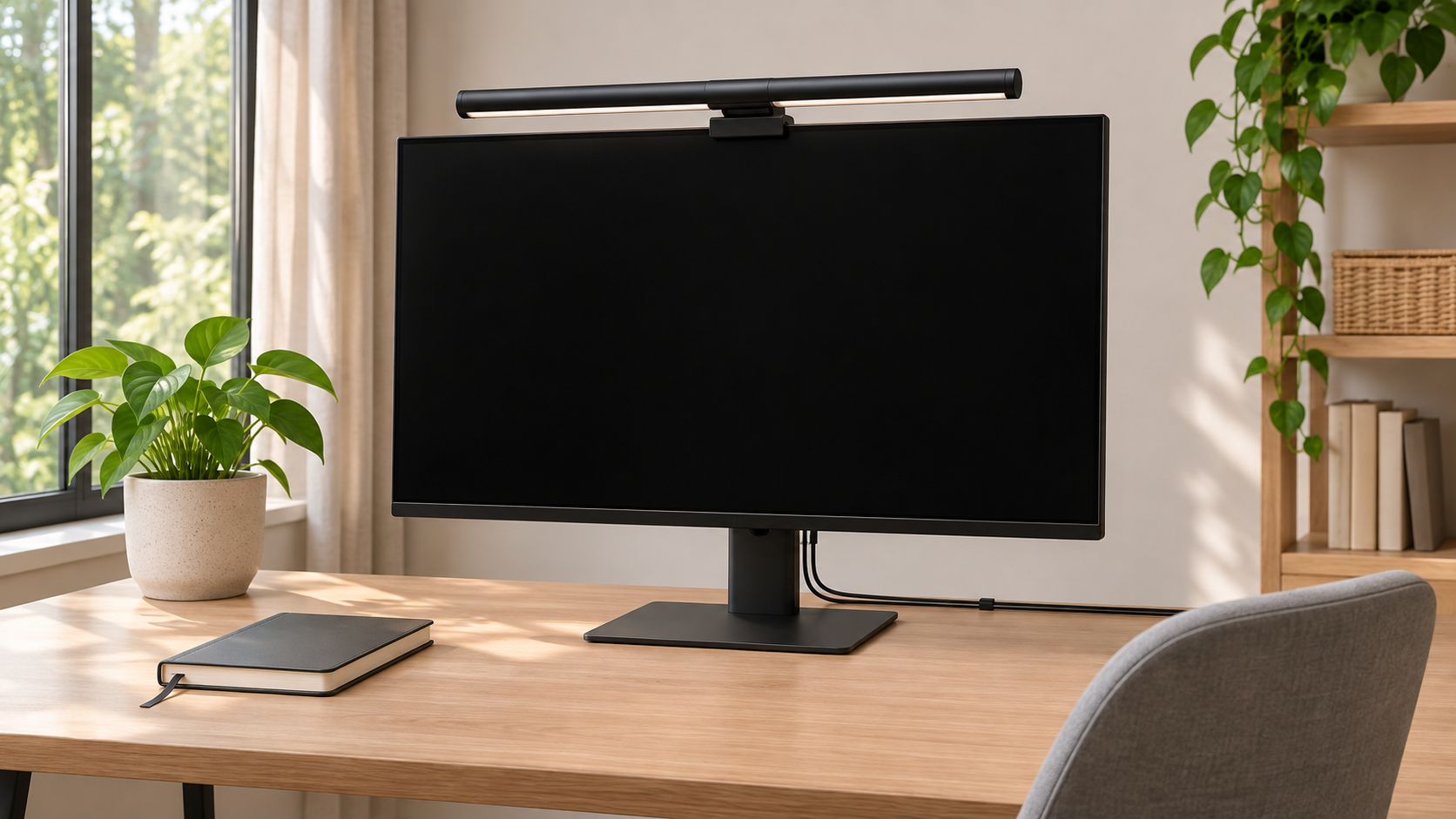
Monitor light bar compatibility means checking the top-edge profile, clip geometry, and the exact USB input before you buy. It is not evidence that a light bar prevents eye fatigue or produces a health benefit.
| Check | Record | Decision |
|---|---|---|
| Top edge | Thickness at the clip contact | Compare with exact model range |
| Back shape | Flat, curved, beveled, raised | Use maker compatibility guidance |
| Top features | Camera, vent, sensor, microphone | Do not obstruct them |
| Power path | Port, adapter, cable route | Match stated USB input |
Measure the monitor where the clamp actually rests
Turn the display around and measure the top at the exact contact point, not at its thickest middle. Photograph any camera, sensor, rear hump, cooling vent, or sloped back. The original BenQ ScreenBar specification gives a 1–3 cm range, but that is for that model only. A similar-looking bar can have another counterweight, shape, or power requirement.
Curved and ultrathin displays deserve a separate check. The rear counterweight may rest on a slope while the front contact point sits on a curved bezel. Do not force a clip flat, add improvised padding, or cover a vent. If the compatibility illustration does not match the monitor’s structure, a freestanding task lamp is the safer purchasing path.
Treat USB power as a specification, not a connector label
The original ScreenBar is specified at 5V/max. 1A USB input. Compare that with the intended monitor port, dock, hub, or adapter using the documentation for each part. USB-A or USB-C shape alone does not prove available power or behavior through sleep and wake.
Test the normal work setup before treating it as finished. A downstream monitor port can depend on an upstream cable or a monitor setting; a hub can change behavior when the computer sleeps. If the light flickers, resets, or behaves differently than instructions describe, use another approved power route rather than assuming an adapter will solve it.
Set the light without promising an eye-health outcome
Mount with the screen off so the clip and cable route are visible. Then use an ordinary document and adjust the product only within its controls. Check reflections, screen legibility, webcam framing, and whether the cable has slack for monitor movement.
Lighting needs depend on daylight, display brightness, surface color, and task. A specification can describe output under stated conditions; it cannot prove relief from eye strain, headaches, or another personal health result. Solve window glare and bad screen placement as layout problems instead of expecting a light bar to correct every condition.
Know when a desk lamp is the better fit
Choose a monitor bar only when the published geometry and power route both work. A freestanding lamp uses desk space, but it does not ask the monitor’s top edge to support hardware. It may be more practical for an integrated webcam, pronounced rear hump, or uncertain clamp contact.
Keep the product page, monitor model, and return terms until fit is confirmed. That record helps if the item meets a published thickness range but conflicts with a monitor-specific feature. For the space below the display, use the guide to under-desk storage without lost legroom, and for a flexible workstation use a pack-away home-office plan.
Make the final comparison from one record
Write the monitor model, the light-bar model, top-edge thickness, back profile, port or adapter, and cable route on one note. Compare only that record with the product specification. This avoids a common mix-up: using one model’s thickness range with another model’s USB requirement. If a retailer description conflicts with the maker’s manual, pause and use the manufacturer’s support channel. Check the return process before opening packaging, because visual compatibility cannot be confirmed without seeing the actual clip against the actual display.
After fit is confirmed, keep the bar clean and make changes deliberately. Removing and reattaching a counterweight repeatedly can create a different contact position each time. Recheck webcam framing after any move and keep cords away from a monitor arm’s pinch points. For shared desks, note the normal brightness and cable route so a new user does not reposition the light casually. None of these routine checks establish a medical or ergonomic benefit; they simply preserve a deliberate setup.
Buying decision in plain language
Buy when the exact monitor profile is listed or clearly supported, the power input is matched, the clip leaves cameras and vents clear, and the desired desk view is practical. Do not buy when one of those facts is unknown. A modest freestanding lamp remains a valid alternative when the monitor is the wrong structure for a clamp. The best outcome is a light source that can be installed without bending, forcing, blocking, or guessing.
Use a repeatable final check
Before placing an order, make one short list for the monitor light bar: monitor top edge, clip position, USB port, cable path, webcam clearance. Put a date beside each observation and identify which detail comes from the actual home and which comes from the manufacturer. This separates known conditions from assumptions. It also prevents a popular marketplace title, an old review, or a photograph of another variant from becoming the deciding evidence. If a required figure is absent from the official materials, do not fill the gap with an estimate.
FAQ
Will every USB port work?
No. Match the exact stated input and test the normal sleep/wake setup.
Can it fit a curved monitor?
Only if the maker confirms the shape and contact geometry, not just thickness.
Should I clip it on with the screen on?
Place it with the screen off, then test the normal viewing and webcam setup.
Does it reduce eye strain?
Do not assume that. A product output specification is not a personal health outcome.
Sources and fact-checking
Checked against the official sources below on November 27, 2026. This is research-based guidance, not a claim of hands-on product testing.


댓글 0
첫 댓글을 남겨보세요.