
Folding Desk for Small Spaces: Measure Open and Folded
A folding desk for small spaces must fit twice: once as a usable workstation and again along the route and storage spot when folded. Measure the open footprint, chair pullback, work-surface depth, leg clearance, hinge and lock behavior, folded thickness, and lifting weight before comparing shelves or finishes.
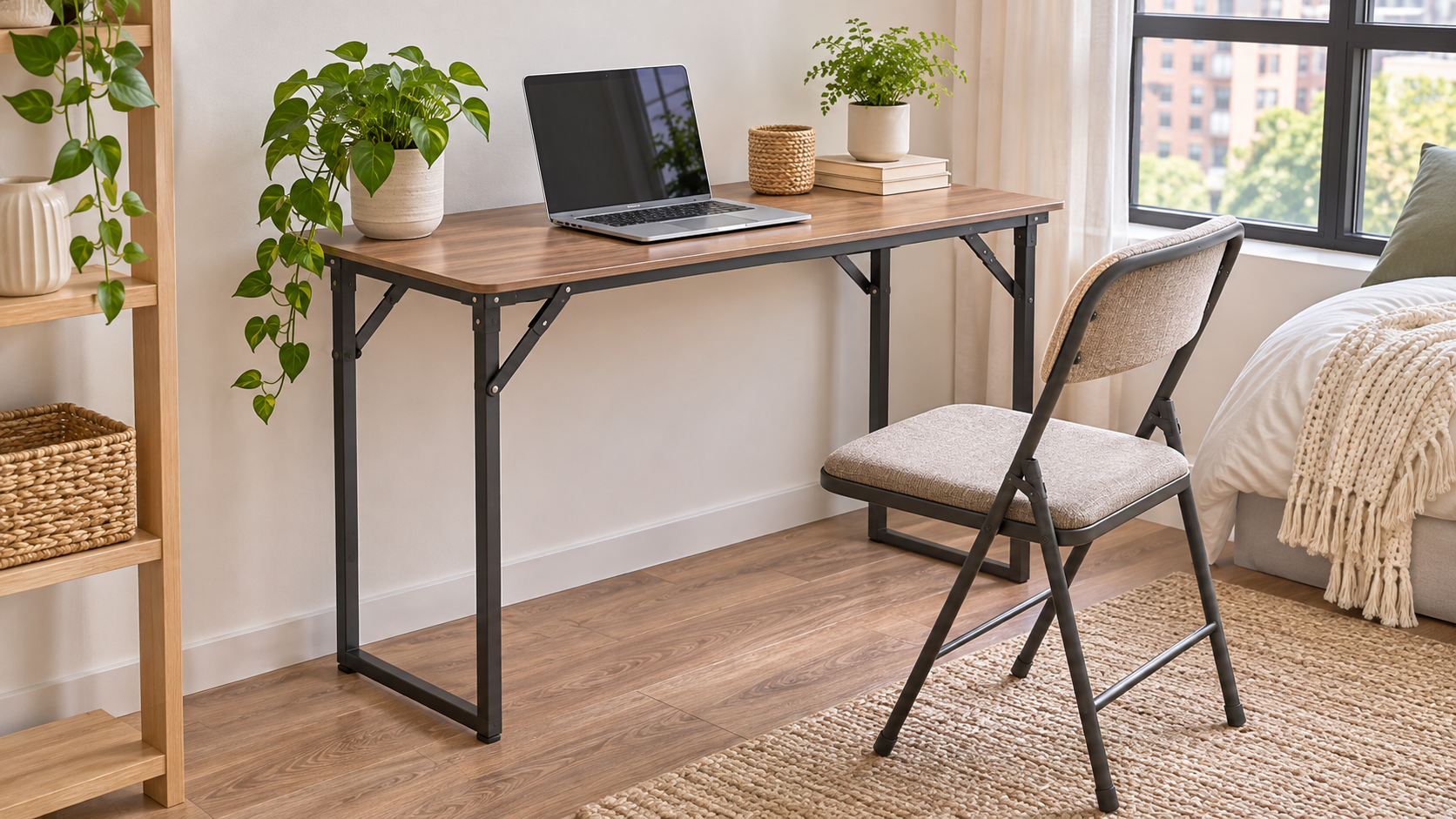
This guide focuses on freestanding folding desks rather than wall-mounted fold-down cabinets. A desk that disappears after work can be valuable in a bedroom or studio, but portability does not excuse poor stability or a surface too shallow for safe screen placement.
Draw the open and folded footprints
Mark the open desk width and depth on the floor with removable tape. Add the chair footprint and enough space to sit down, stand up, and pass behind the chair. Then map the folded dimensions and the entire route to storage, including door handles, rugs, bed frames, and corners.
OSHA workstation guidance says the desk should provide adequate leg clearance and enough depth to place a monitor at least 20 inches away. That is occupational guidance rather than a product certification, but it is a useful test: a narrow desk may hold a laptop while failing as an all-day monitor workstation.
| Measurement | Open-use question | Folded-storage question | Typical failure |
|---|---|---|---|
| Width | Does keyboard, mouse, notebook, and lamp fit? | Will it pass the doorway and storage gap? | Accessories hang over the edge |
| Depth | Can the screen sit far enough away with wrists supported? | Does the folded top increase overall thickness? | Monitor is too close or pushed sideways |
| Height and clearance | Do thighs, knees, and feet fit without crossbars? | Can it stand or lie safely in storage? | Frame blocks knees or chair approach |
| Weight and lock | Can it remain stable during typing? | Can one person lift and carry it safely? | Desk opens while moving or collapses under load |
Nine buying checks for a folding desk for small spaces
1. Measure the complete open zone
Include the desk, chair, seated body, and path to stand. If the desk sits beside a bed, closet, or balcony door, test those doors while the floor outline is in place. A product photo that shows only the desktop hides the space needed for knees, chair legs, and movement.
2. Check real work-surface depth
Measure the laptop or monitor base, keyboard, wrist position, and any notebook used at the same time. OSHA suggests enough depth for a monitor at least 20 inches from the user. A very shallow desk may work for brief laptop sessions but force awkward posture with a large screen or separate keyboard.
3. Inspect under-desk clearance
Look for lower shelves, front braces, diagonal supports, hinges, and center bars. Compare knee depth, foot depth, and width with your chair and body. Do not plan to fill the under-desk area with storage if it prevents you from pulling close to the keyboard. Rounded front edges are preferable where forearms contact the top.
4. Verify the locking mechanism
A folding frame should have a clear open position and resist accidental collapse. Read assembly diagrams and reviews for the exact hinge or latch, then inspect it on arrival. Confirm whether both sides lock and whether fingers can be kept away from pinch points. A desk that depends only on gravity may not suit homes with children or pets.
5. Compare levelers and floor contact
Small apartments often have uneven floors or rugs. Adjustable feet can reduce rocking, but only when they remain fully engaged and do not damage flooring. Check whether the desk is approved for carpet, whether the frame twists when moved, and whether protective pads change the effective height or stability.
6. Read the load limit conservatively
The published maximum may describe evenly distributed static weight, not a person leaning on one corner or a monitor arm clamped to the edge. Add the weight of screens, computer, books, and accessories. If the manual does not permit monitor arms, shelves, or casters, do not improvise them because the desktop and folding frame may not handle concentrated loads.
7. Measure the folded form and route
Record folded width, height, thickness, and weight. Test the route from work zone to closet, wall gap, or under-bed space. A thin desk can still be too wide to turn through a doorway. Decide whether it will be carried, rolled, or stored upright, and verify the manufacturer’s approved storage orientation.
8. Plan cable disconnection
A folding desk only saves space if accessories can be cleared quickly. Use a simple cable path that does not wrap around hinges or remain connected while the desk moves. Keep power strips off moving joints and do not fold the desk against live plugs. A small tray for charger, mouse, and notebook can make setup repeatable.
9. Confirm exact identity and recall history
Record the brand, model, seller, dimensions, load limit, and instructions. Search the CPSC recalls database, especially for desks with electrical outlets, moving parts, glass, or children’s furniture features. Similar marketplace listings can use different frames or hardware even when product photos look the same.
Open-and-folded measurement worksheet
- Open zone: desk width and depth, chair, body, standing path, doors, drawers, and bed clearance.
- Work surface: monitor distance, laptop, keyboard, mouse, notebook, lamp, and front-edge comfort.
- Legroom: thigh height, knee depth, foot depth, crossbars, shelves, and chair approach.
- Stability: locks, hinges, levelers, floor type, load limit, and concentrated loads.
- Folded route: folded size, weight, door turns, rugs, stairs, and approved storage position.
- Reset: cable release, accessory tray, cooldown for electronics, and time to clear the desktop.
These TrendIssue guides help the desk coexist with storage and everyday movement.
- Under Desk Storage: Measure Legroom Before You Buy — protect the clearance you measured
- Small Dining Room Table That Doubles as a Desk — compare a permanent multipurpose surface with a folding one
- Rolling Storage Cart for Small Spaces — move office supplies without loading the folding frame
Test the desk with a full work session
A short assembly check will not reveal screen distance, edge pressure, cable friction, or rocking during typing.
- 1. Tape the zone: Mark open and folded dimensions before unboxing and keep the return packaging.
- 2. Inspect hardware: Open the desk without equipment, verify every lock, and check pinch points and levelers.
- 3. Load gradually: Add the laptop or monitor, keyboard, mouse, and notebook while watching for flex or rocking.
- 4. Work for one session: Check shoulder position, monitor distance, thigh clearance, and whether frequently used items stay within reach.
- 5. Fold and store: Disconnect power, clear accessories, let electronics cool, and move the desk through the real storage route.
Common mistakes and tradeoffs
Measuring only the top: The chair, body, open doors, and standing path often use more space than the desk.
Filling the leg zone with bins: Storage that blocks knees and feet defeats workstation fit.
Using the maximum load as a leaning rating: Static distributed capacity does not guarantee edge or impact strength.
Ignoring pinch points: Hinges and locks need clear hand positions during every setup.
Buying a desk that is hard to fold: If clearing and moving it is awkward, it will remain open and provide no space-saving benefit.
Frequently asked questions
How deep should a folding desk be for a monitor?
OSHA suggests enough depth to place a monitor at least 20 inches away. Your screen base, keyboard, and posture determine whether a particular desk can achieve that.
Can I put a monitor arm on a folding desk?
Only if the manufacturer permits it and the top, edge, frame, and load rating support the concentrated force. Many lightweight folding tops are not designed for clamps.
Is a folding desk stable enough for daily work?
Some are, but verify locks, frame rigidity, levelers, floor contact, and load behavior with your equipment. Portability and stability vary by design.
Where should I store it folded?
Use the orientation approved by the manufacturer in a dry location where it cannot tip, unfold, block an exit, or damage cords and hinges.
Sources and fact-checking
- Occupational Safety and Health Administration: Computer Workstation Desks
- OSHA: Computer Workstation Purchasing Guide
- U.S. Consumer Product Safety Commission: Recalls & Product Safety Warnings
Fact-check completed November 16, 2026. Product specifications, prices, manuals, and recall status can change, so verify the exact model before purchase.




댓글 0
첫 댓글을 남겨보세요.