
Toaster Crumb Tray Cleaning: A Safer, No-Guesswork Routine
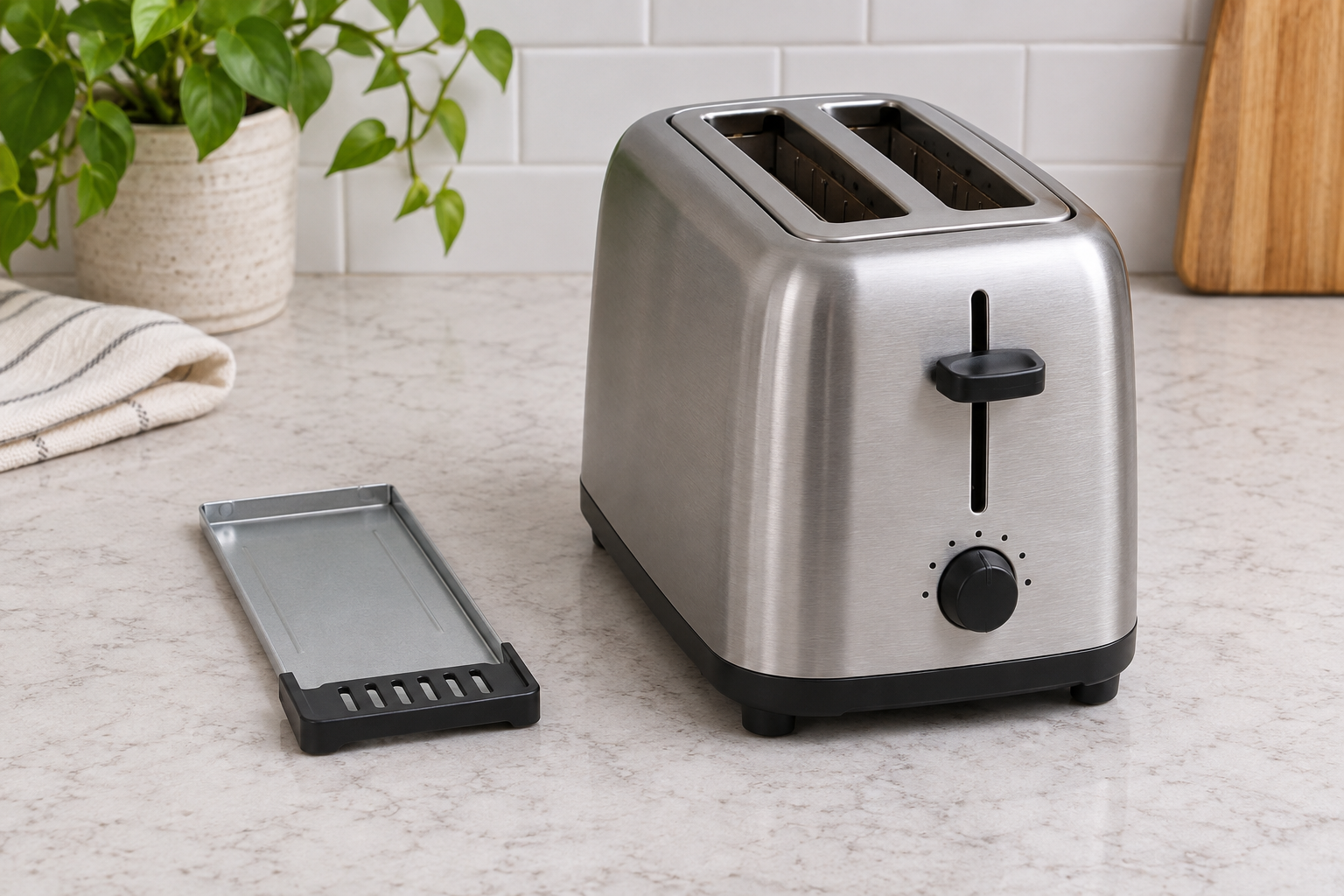
Toaster crumb tray cleaning is simple when the toaster is unplugged, completely cool, and handled only from the outside: remove the tray the way the manual shows, discard the crumbs, wipe the tray, and put it back. Do not add water to the toaster, operate it without its tray, or put a metal utensil into the slots.
This is advice for a pop-up toaster, not a toaster oven. The two appliances are cleaned and positioned differently. A pop-up toaster’s crumb tray is a removable collector near the base. The slots and heating wires are not a place to poke around, even when a crumb or a piece of bread looks reachable.
Make it cold and disconnected before the tray moves
Unplug the toaster from the wall outlet and let it cool completely. Both the Cuisinart CPT-1800 and Hamilton Beach 22992 instruction booklets put those steps before cleaning. The Cuisinart manual also says not to immerse the cord, plug, or any part of the toaster in water or other liquid. That rules out rinsing the appliance, pouring water into its slots, or trying to wash it in a sink.
Move the toaster to a steady counter only after it is cool. Clear a place where the crumbs can go straight into a trash can. If you have just used the toaster, do not try to hurry the cool-down by putting it near water or by moving it while hot.
Find the tray style before you pull
Look underneath or at the front or rear of the toaster for the tray’s pull area. Tray layouts vary. The Cuisinart CPT-1800 has a front crumb tray that pulls out. The Hamilton Beach 22992 uses a slide-out crumb tray. Other pop-up toaster models may have a drop-down tray rather than a fully removable one. Your model number, often on the base, is more useful than a generic video when the tray does not move as expected.
Pull the tray straight and slowly. Keep it level over the trash so crumbs do not fall onto the counter or into the toaster. Do not force a tray that catches. Check whether a latch, notch, or directional instruction applies to your model, then use the manual rather than bending the tray edge.
| Task | Manual-based action | Boundary to keep |
|---|---|---|
| Before cleaning | Unplug and allow the toaster to cool completely | Do not clean a hot or connected toaster |
| Removing crumbs | Remove or open the tray as your model directs, then discard crumbs | Do not operate without the tray in place |
| Cleaning the tray | Wipe it clean with a cloth as the manual permits | Do not assume the tray is dishwasher-safe |
| Cleaning the exterior | Use a clean damp cloth and dry it thoroughly when allowed | Do not use abrasive cleaner or wet the slots |
| Food stuck in a slot | Follow the exact manufacturer instruction after unplugging and cooling | Never insert metal or sharp tools into slots |
Empty and wipe the crumb tray
Once the tray is out, discard crumbs into the trash. The Cuisinart CPT-1800 booklet instructs the owner to wipe the crumb tray clean and replace it. Hamilton Beach’s 22992 booklet directs the owner to slide out the tray, discard crumbs, wipe it with a clean cloth, and slide it back into place. Neither instruction turns the removable tray into permission to soak the toaster itself.
Dryness matters here. If your own model permits a damp cloth for a removable tray, make sure it is dry before it goes back into the toaster. Do not assume a crumb tray is dishwasher-safe just because it is removable. The answer can differ by model, and the current use and care booklet is the deciding document.
Replace the tray before the toaster is used again
Slide or close the tray fully so it sits as intended. The Cuisinart CPT-1800 manual expressly says never to operate the toaster without the crumb tray in place. A tray that is tilted, partly open, or missing is a reason to stop and reseat it, not to run a test cycle.
Hamilton Beach gives a model-specific frequency note for its 22992: if used daily, the crumb tray should be cleaned daily. That is not a universal schedule for all toasters. Cuisinart’s CPT-1800 booklet gives the cleaning procedure but does not set that same interval. The practical rule is to use the schedule, if any, printed for your exact model and clean when the manual directs. Avoid presenting one brand’s interval as a safety guarantee for another.
Leave the slots alone, especially with metal tools
Crumbs are one thing; food wedged in a slot is another. Cuisinart says to unplug the toaster before removing remaining bread pieces and warns never to insert hard or sharp instruments into the slots. Hamilton Beach says that, once the toaster is disconnected and cool, a nonmetal utensil may be used to loosen food from the grill wires so it can fall into the crumb tray. That is specific guidance for that Hamilton Beach model, not permission to use a fork or knife in every toaster.
Never attempt to dislodge food while the toaster is plugged in. Do not use a fork, knife, skewer, screwdriver, or any other metal object in the slots. If your manual does not give a clear way to deal with lodged food, contact the manufacturer rather than reaching into the appliance.
Wipe the exterior without washing the appliance
For the exterior, the Cuisinart CPT-1800 says to use a clean damp cloth and dry thoroughly, without abrasive cleaners. Hamilton Beach’s 22992 likewise says to wipe the exterior with a damp cloth and avoid abrasive cleansers that can scratch the surface. Apply that only to the outside surface. Do not spray cleaner into openings, pour liquid over the top, or treat a pop-up toaster like a removable-plate appliance.
The Hamilton Beach 22992 additionally says not to turn the toaster upside down for crumb removal; it calls for gently tapping the sides to release crumbs before emptying the tray. That is another model-specific direction worth following when it matches your toaster. If yours says to shake or tilt in a particular way, use that document instead.
Keep the appliance type straight
A crumb tray is not a signal that every countertop bread appliance has the same cleaning rules. If you also own a toaster oven, see our toaster oven cabinet clearance guide for the separate placement and storage question. For an example of why removable parts still need model-specific washing instructions, our electric griddle cleaning guide helps you compare a removable cooking surface with a toaster’s dry crumb collector.
FAQ
Can I wash a toaster crumb tray in the dishwasher?
Only if the manual for your exact toaster says so. The Cuisinart and Hamilton Beach materials reviewed here instruct wiping the tray, not dishwasher washing.
Can I clean crumbs out while the toaster is plugged in?
No. Unplug it and allow it to cool first. Do not attempt to dislodge food while the toaster is connected to an outlet.
What should I use if bread is stuck in the slot?
Check the model manual. Hamilton Beach 22992 allows a nonmetal utensil only after the toaster is disconnected and cool. Cuisinart warns against hard or sharp instruments. Never use metal in the slots.
How often should I clean the crumb tray?
Use the interval in your model’s manual. Hamilton Beach 22992 specifies daily tray cleaning when the toaster is used daily, while other manuals may not state the same schedule. Do not transfer one model’s interval to another.
Sources and fact-checking
- Cuisinart CPT-1800 instruction booklet: cool and unplug directions, exterior cleaning, tray removal and replacement, and the no-hard-or-sharp-instruments warning.
- Hamilton Beach 22992 Use & Care guide: slide-out tray procedure, model-specific frequency note, no-upside-down direction, and nonmetal guidance for lodged food.
Research note: This article is based on the cited manufacturer materials, reviewed November 28, 2026. It does not claim hands-on testing. Use the current manual for the exact model in your kitchen.


댓글 0
첫 댓글을 남겨보세요.